ComfyUI-JoyCaption
Joy Caption is a ComfyUI custom node powered by the LLaVA model for efficient, stylized image captioning. Caption Tools nodes handle batch image processing and automatic separation of caption text.
News & Updates
- 2025/10/27: Added Custom Models v2.0.2 ( update.md )
- 2025/10/20: Update and bug fix ComfyUI-JoyCaption to v2.0.1 ( update.md )
- 2025/08/22: Update ComfyUI-JoyCaption to v2.0.0 ( update.md )
- Added GGUF model support for better performance and compatibility
- Fixed critical parameter handling issues (top_k, image format)
- Improved console output (no more base64 spam)
- Enhanced error handling and stability
- Added JoyCaption GGUF and JoyCaption GGUF (Advanced) nodes
- Enhanced GGUF Support: Comprehensive support for 12 quantization levels (Q2_K to F16)
- llama_cpp_install folder: Complete installation guides and automated scripts for llama-cpp-python
- Simplified Installation: One-click llama-cpp-python installation with automatic CUDA support
- Cross-Platform Support: Windows, macOS, and Linux installation guides
- Performance Improvements: Optimized model loading and memory management
- 2025/06/15: Update ComfyUI-JoyCaption to v1.2.0 ( update.md )
- Enhanced CUDA performance optimization
- Improved memory management strategies
- Added Global Cache mode for faster processing
-
2025/06/07: Update ComfyUI-JoyCaption to v1.1.1 ( update.md )
- 2025/06/05: Update ComfyUI-JoyCaption to v1.1.0 ( update.md )
- Add Caption tools
Features
- Simple and user-friendly interface
- Multiple caption types support
- Flexible length control
- Memory optimization options
- GGUF model support - Efficient quantized models for better performance and lower memory usage
- Automatic model download - Models will be downloaded automatically and properly renamed on first use
- Support for multiple caption types
- Support for advanced customization options
- Multiple precision options (fp32, bf16, fp16, 8-bit, 4-bit)
- Enhanced memory management with Global Cache mode
- Clean console output (no debug spam)
- Robust error handling and parameter validation
- llama_cpp_install folder - Complete installation guides and automated scripts for llama-cpp-python
Installation
- Clone this repository to your
ComfyUI/custom_nodesdirectory:cd ComfyUI/custom_nodes git clone https://github.com/1038lab/ComfyUI-JoyCaption.git - Install the required dependencies:
cd ComfyUI/custom_nodes/ComfyUI-JoyCaption pip install -r requirements.txt - For GGUF Models (Recommended): Install llama-cpp-python with CUDA support:
```bash
Option 1: Automated installation (Recommended)
python llama_cpp_install/llama_cpp_install.py
Option 2: Manual installation
pip install -r requirements_gguf.txt ```
Installation Guides Available:
Download Models
The models will be automatically downloaded and renamed on first use, or you can manually download them:
Standard Models (HuggingFace Format)
| Model | Link | Memory Usage | | —– | —- | ———— | | JoyCaption Beta One | Download | ~8-16GB | | JoyCaption Alpha Two | Download | ~8-16GB |
GGUF Models (Quantized, Recommended)
| Model | Size | Memory Usage | Quality | Recommended For | Link | | —– | —- | ———— | ——- | ————— | —- | | JoyCaption Beta One (Q2_K) | 3.18GB | ~4GB | Good | Low VRAM (6GB+) | Download | | JoyCaption Beta One (Q3_K_S) | 3.66GB | ~5GB | Good+ | Budget systems (8GB+) | Download | | JoyCaption Beta One (Q3_K_M) | 4.02GB | ~5GB | Better | Balanced performance | Download | | JoyCaption Beta One (Q3_K_L) | 4.32GB | ~6GB | Better+ | Good quality/size ratio | Download | | JoyCaption Beta One (IQ4_XS) | 4.48GB | ~6GB | Very Good | Recommended (8GB+) | Download | | JoyCaption Beta One (Q4_K_S) | 4.69GB | ~6GB | Very Good | Quality focused | Download | | JoyCaption Beta One (Q4_K_M) | 4.92GB | ~7GB | Very Good+ | Balanced choice | Download | | JoyCaption Beta One (Q5_K_S) | 5.60GB | ~7GB | Excellent | High quality (10GB+) | Download | | JoyCaption Beta One (Q5_K_M) | 5.73GB | ~8GB | Excellent+ | Premium quality | Download | | JoyCaption Beta One (Q6_K) | 6.60GB | ~8GB | Near Original | Maximum quality (12GB+) | Download | | JoyCaption Beta One (Q8_0) | 8.54GB | ~10GB | Original- | Full precision alternative | Download | | JoyCaption Beta One (F16) | 16.1GB | ~18GB | Original | Full precision (24GB+) | Download |
Alternative GGUF Sources
| Model | Size | Source | Link | | —– | —- | —— | —- | | JoyCaption Beta One (Q4_K) | 4.92GB | concedo | Download | | JoyCaption Beta One (Q8_0) | 8.54GB | concedo | Download | | JoyCaption Beta One (F16) | 16.1GB | concedo | Download |
Note: GGUF models also require the vision projection model:
After downloading, place the model files in your ComfyUI/models/LLM/GGUF directory.
Basic Usage
Standard Nodes (HuggingFace Models)
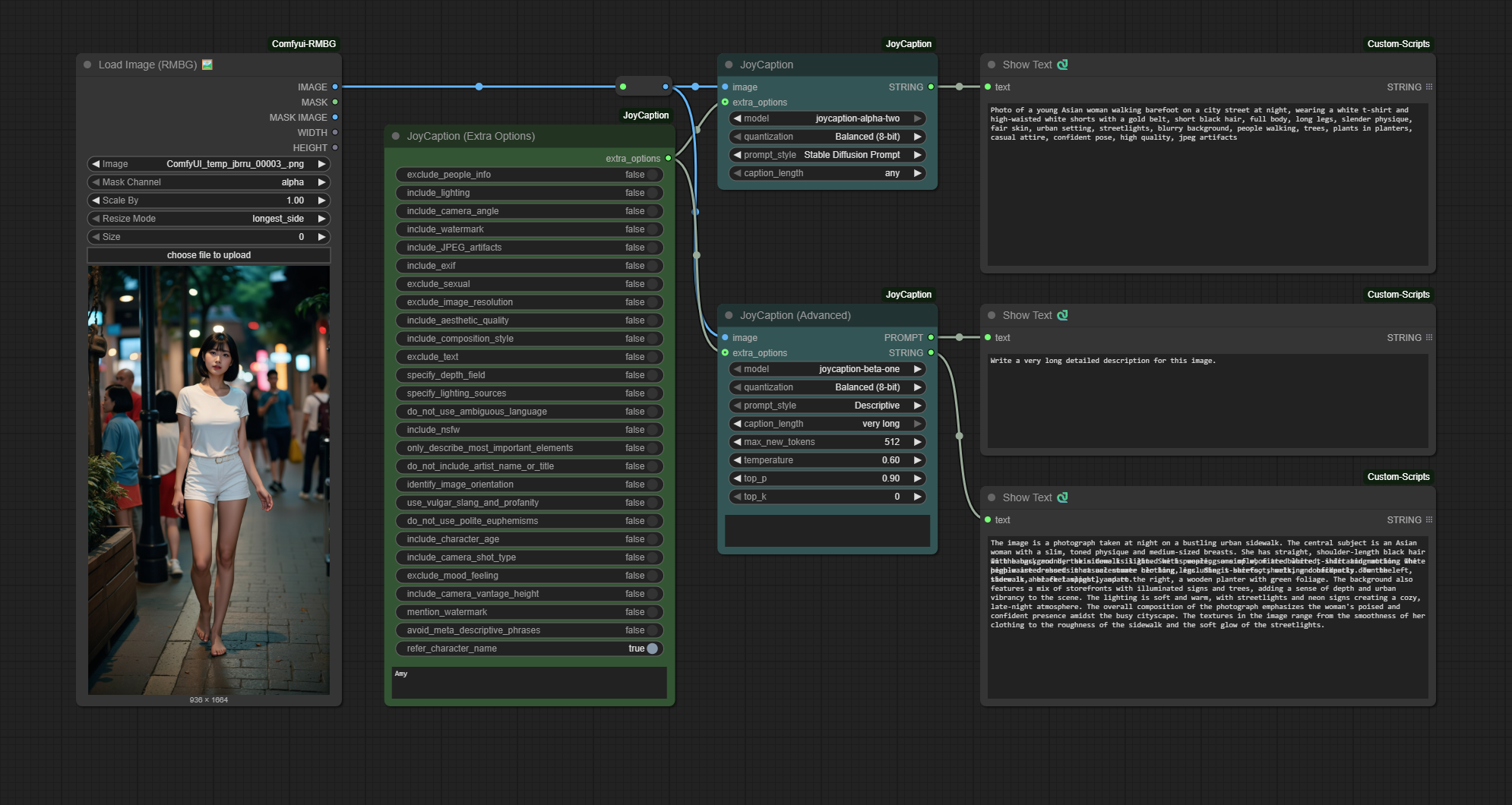
Basic Node
- Add the “JoyCaption” node from the
🧪AILab/📝JoyCaptioncategory - Connect an image source to the node
- Select the model file (defaults to
llama-joycaption-beta-one-hf-llava) - Adjust the parameters as needed
- Run the workflow
Advanced Node
- Add the “JoyCaption (Advanced)” node from the
🧪AILab/📝JoyCaptioncategory - Connect an image source to the node
- Select the caption type
- Adjust the parameters as needed
- Run the workflow
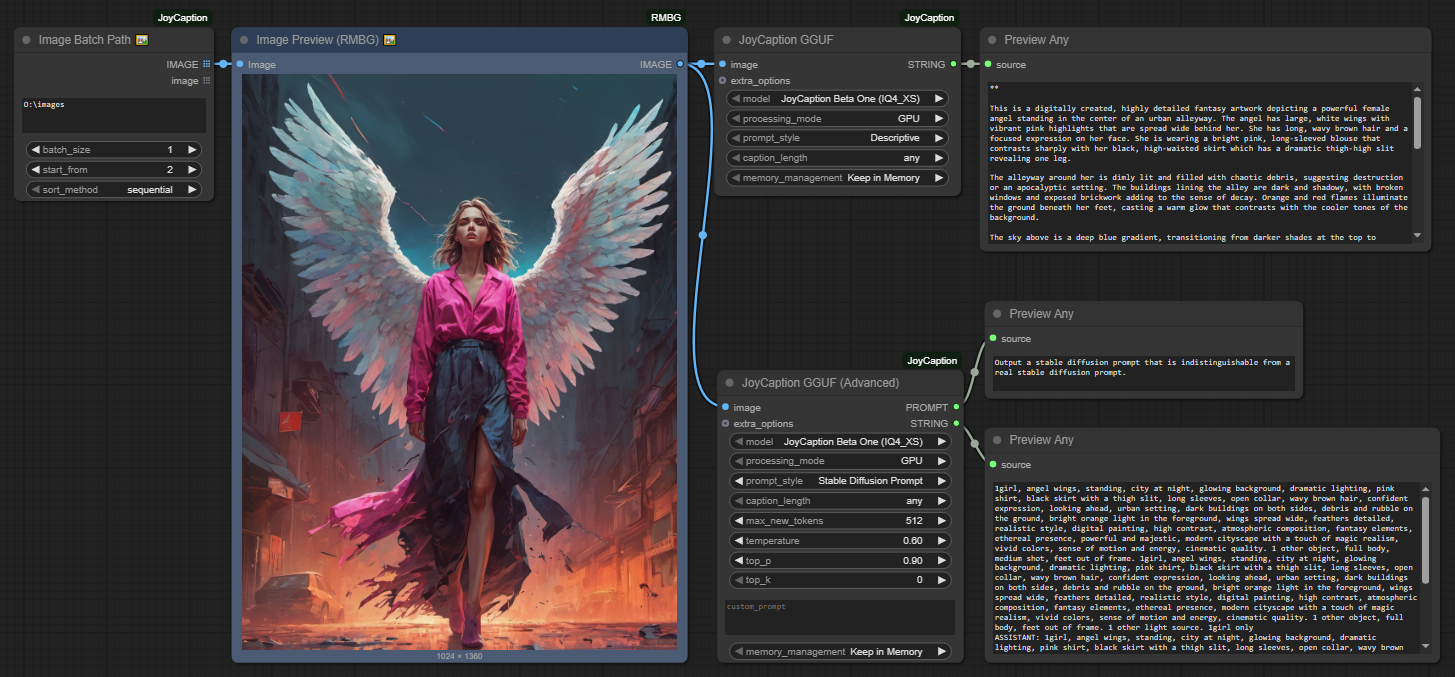
GGUF Nodes (Recommended for Better Performance)
GGUF Basic Node
- Add the “JoyCaption GGUF” node from the
🧪AILab/📝JoyCaption-GGUFcategory - Connect an image source to the node
- Select the GGUF model (e.g., “JoyCaption Beta One (IQ4_XS)”)
- Choose processing mode (GPU/CPU)
- Select caption style and length
- Run the workflow
GGUF Advanced Node
- Add the “JoyCaption GGUF (Advanced)” node from the
🧪AILab/📝JoyCaption-GGUFcategory - Connect an image source to the node
- Configure all generation parameters (temperature, top_p, top_k, etc.)
- Set custom prompts if needed
- Run the workflow
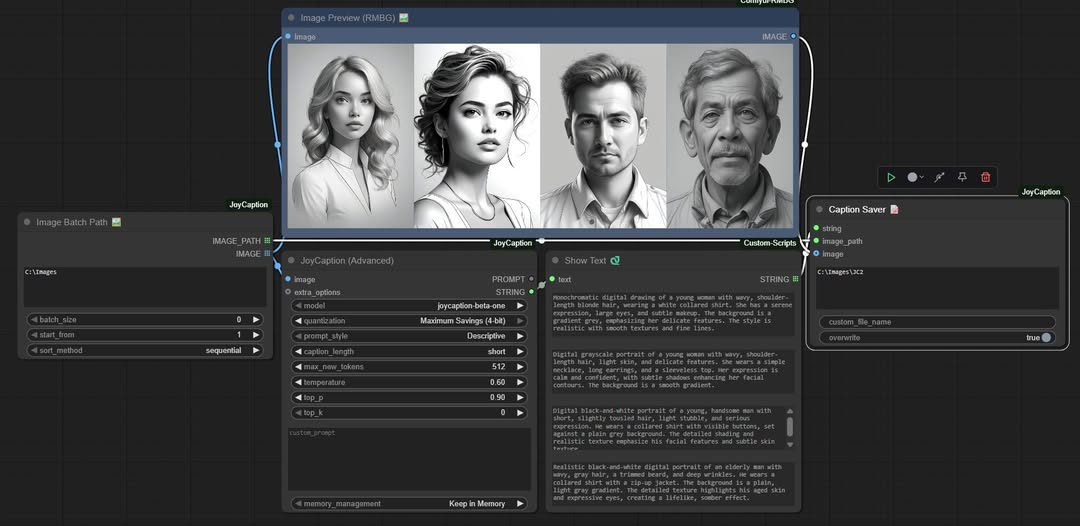
Caption Tools
Image Batch Path 🖼️
This node allows you to load multiple images from a directory for batch processing:
| Parameter | Description |
|---|---|
| image_dir | Directory path containing images |
| batch_size | Number of images to load (0 = all images) |
| start_from | Start from Nth image (1 = first image) |
| sort_method | Image loading order: sequential/reverse/random |
Caption Saver 📝
This node saves generated captions to text files:
| Parameter | Description |
|---|---|
| string | Caption text to save |
| image_path | Path to the image being captioned |
| image | (Optional) Image to save alongside the caption |
| custom_output_path | (Optional) Custom output directory path |
| custom_file_name | (Optional) Custom filename (without extension) |
| overwrite | If true, will overwrite existing files; if false, will add a number to make the filename unique |
Parameters
Standard Nodes
Basic Node
| Parameter | Description | Default | Range |
| ——— | ———– | ——- | —– |
| Model | The JoyCaption model to use | llama-joycaption-beta-one-hf-llava | - |
| Memory Control | Memory optimization settings | Default | Default (fp32), Balanced (8-bit), Maximum Savings (4-bit) |
| Caption Type | Caption style selection | Descriptive | Descriptive, Descriptive (Casual), Straightforward, Tags, Technical, Artistic |
| Caption Length | Output length control | medium | any, very short, short, medium, long, very long |
GGUF Nodes
GGUF Basic Node
| Parameter | Description | Default | Range | | ——— | ———– | ——- | —– | | Model | GGUF model to use | JoyCaption Beta One (IQ4_XS) | Q2_K, IQ4_XS, Q5_K_M, Q6_K | | Processing Mode | Hardware acceleration | GPU | GPU, CPU | | Caption Type | Caption style selection | Descriptive | Descriptive, Descriptive (Casual), Straightforward, Tags, Technical, Artistic | | Caption Length | Output length control | any | any, very short, short, medium, long, very long | | Memory Management | Model memory handling | Keep in Memory | Keep in Memory, Clear After Run, Global Cache |
GGUF Advanced Node
| Parameter | Description | Default | Range | | ——— | ———– | ——- | —– | | Model | GGUF model to use | JoyCaption Beta One (IQ4_XS) | Q2_K, IQ4_XS, Q5_K_M, Q6_K | | Processing Mode | Hardware acceleration | GPU | GPU, CPU | | Max New Tokens | Maximum tokens to generate | 512 | 1-2048 | | Temperature | Generation randomness | 0.6 | 0.0-2.0 | | Top-p | Nucleus sampling | 0.9 | 0.0-1.0 | | Top-k | Top-k sampling | 0 | 0-100 | | Custom Prompt | Custom prompt template | “” | Any text | | Memory Management | Model memory handling | Keep in Memory | Keep in Memory, Clear After Run, Global Cache |
Quantization Options
Standard Models (HuggingFace)
| Mode | Precision | Memory Usage | Speed | Quality | Recommended GPU | |——|———–|————–|——-|———|—————-| | Default | fp32 | ~16GB | 1x | Best | 24GB+ | | Default | bf16 | ~8GB | 1.5x | Excellent | 16GB+ | | Default | fp16 | ~8GB | 2x | Very Good | 16GB+ | | Balanced | 8-bit | ~4GB | 2.5x | Good | 12GB+ | | Maximum Savings | 4-bit | ~2GB | 3x | Acceptable | 8GB+ |
GGUF Models (Recommended)
| Quantization | Model Size | Memory Usage | Speed | Quality | Recommended GPU | |————-|————|————–|——-|———|—————-| | Q2_K | 3.18GB | ~4GB | 4x | Good | 6GB+ | | Q3_K_S | 3.66GB | ~5GB | 3.5x | Good+ | 8GB+ | | Q3_K_M | 4.02GB | ~5GB | 3.5x | Better | 8GB+ | | Q3_K_L | 4.32GB | ~6GB | 3x | Better+ | 8GB+ | | IQ4_XS | 4.48GB | ~6GB | 3x | Very Good | 8GB+ | | Q4_K_S | 4.69GB | ~6GB | 3x | Very Good | 8GB+ | | Q4_K_M | 4.92GB | ~7GB | 2.5x | Very Good+ | 10GB+ | | Q5_K_S | 5.60GB | ~7GB | 2.5x | Excellent | 10GB+ | | Q5_K_M | 5.73GB | ~8GB | 2.5x | Excellent+ | 12GB+ | | Q6_K | 6.60GB | ~8GB | 2x | Near Original | 12GB+ | | Q8_0 | 8.54GB | ~10GB | 1.8x | Original- | 16GB+ | | F16 | 16.1GB | ~18GB | 1.5x | Original | 24GB+ |
Note: GGUF models provide better performance and lower memory usage compared to standard models. IQ4_XS offers the best balance of quality and efficiency.
Advanced Node
| Parameter | Description | Default | Range |
|---|---|---|---|
| Extra Options | Additional feature options | [] | Multiple options |
| Person Name | Name for person descriptions | ”” | Any text |
| Max New Tokens | Maximum tokens to generate | 512 | 1-2048 |
| Temperature | Generation temperature | 0.6 | 0.0-2.0 |
| Top-p | Sampling parameter | 0.9 | 0.0-1.0 |
| Top-k | Top-k sampling | 0 | 0-100 |
| Precision | Use fp32 for best quality, bf16 for balanced performance, fp16 for maximum speed. 8-bit and 4-bit quantization provide significant memory savings with minimal quality impact |
Memory Management Options
| Mode | Description | Recommended Use |
|---|---|---|
| Global Cache | Keeps model in memory for fastest processing | High VRAM GPUs (16GB+) |
| Keep in Memory | Maintains model in memory until workflow ends | Medium VRAM GPUs (8GB+) |
| Clear After Run | Clears model after each generation | Low VRAM GPUs (<8GB) |
Setting Tips
| Setting | Recommendation |
|---|---|
| Model Choice | Use GGUF models for better performance and lower memory usage. IQ4_XS offers the best balance of quality and efficiency |
| Memory Mode | Based on GPU VRAM: 24GB+ use Global Cache, 12GB+ use Keep in Memory, 8GB+ use Clear After Run |
| Processing Mode | Use GPU mode for faster processing, CPU mode for systems with limited VRAM |
| Input Resolution | The model works best with images of 512x512 or higher resolution |
| Memory Usage | If you encounter memory issues, try GGUF Q2_K model or use Clear After Run mode |
| Performance | For batch processing, consider using Global Cache mode with GGUF models if you have sufficient VRAM |
| Temperature | Lower values (0.6-0.7) for more stable results, higher values (0.8-1.0) for more diverse results |
| Top-k Parameter | Set to 0 to disable, or use values like 40-50 for more focused generation |
About Model
This implementation uses LLaVA-based image captioning models, optimized to provide fast and accurate image descriptions.
Model features:
- Free and open weights
- Uncensored content coverage
- Broad style diversity (digital art, photoreal, anime, etc.)
- Fast processing with bfloat16 precision
- High-quality caption generation
- Memory-efficient operation
- Consistent results across various image types
- Support for multiple caption styles
- Optimized for training diffusion models
The models are trained on diverse datasets, ensuring:
- Balanced representation across different image types
- High accuracy in various scenarios
- Robust performance with complex scenes
- Support for both SFW and NSFW content
- Equal coverage of different styles and concepts
Roadmap
✅ Completed (v1.3.0)
- ✅ GGUF model support for better performance
- ✅ Support for 12 GGUF quantization formats (Q2_K to F16)
- ✅ Enhanced error handling and parameter validation
- ✅ Clean console output (no debug spam)
- ✅ Improved memory management options
- ✅ Batch processing support (Caption Tools)
- ✅ Performance optimizations for CPU processing (GGUF CPU mode)
- ✅ Enhanced batch processing features with memory management
🔄 Future Plans
- More caption style options and custom prompts
- Advanced fine-tuning support for custom models
- Real-time processing optimizations
- Multi-language caption support
- Integration with more vision-language models
Credits
- Original JoyCaption Model: fancyfeast - Creator of the base JoyCaption models
- GGUF Quantized Models: mradermacher - Provider of comprehensive GGUF quantized models (Q2_K to F16)
- Alternative GGUF Models: concedo - Provider of alternative GGUF models with vision projection
- ComfyUI Integration: 1038lab - Developer of this ComfyUI custom node
- LLaVA Framework: Microsoft Research - Base vision-language model architecture
- llama-cpp-python: abetlen - Python bindings for llama.cpp
License
This repository’s code is released under the GPL-3.0 License.